
NavVis System Software
Where intelligence meets performance
NavVis System Software

At their core, NavVis devices run on a customized Linux OS. This ensures flexibility, stability, and full control over system behavior, performance, and security.

The software seamlessly synchronizes sensors like LiDAR, cameras, and IMU, ensuring the data is perfectly aligned for accurate mapping.

Using a proprietary SLAM algorithm, NavVis devices calculate precise positioning and orientation as they move through a space, offering instant feedback for a seamless scanning experience.
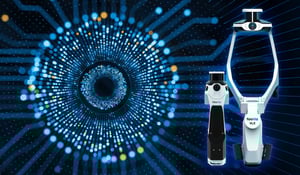

Data isn’t just stored; it’s smartly compressed, preserving high resolution while keeping file sizes manageable, giving you high-performance results that are easy to work with.

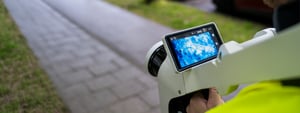
With a touchscreen interface designed for all skill levels, users can easily navigate through setup, scanning, and quality checks. The interface tracks your trajectory in real-time and provides instant feedback and system diagnostics. This ensures users can monitor performance, adjust as needed, and verify scan quality on the fly.

NavVis system software supports easy export to NavVis IVION Processing, all sensor data, calibration parameters, and scan settings, ensuring data integrity and real-time synchronization for accurate processing and analysis.
Experience the value. Trust the results.
NavVis system software combines continuously evolving, powerful under-the-hood performance with an intuitive field experience to deliver exceptional data.

Intuitive user experiences, combined with proprietary algorithms and intelligent system processes, deliver accurate, high-quality results with minimal setup and manual intervention. Spend less time correcting data and keep capture efficient, reliable, and repeatable

Immediate, in-field feedback shows coverage, flags issues, and helps guide scanning in real time. Catch gaps early, avoid return visits, reduce delays, and deliver complete, reliable data with confidence.

Take on more projects without losing control. Consistent accuracy across sites supports scale without added risk, rework, or training overhead, while continuous system software improvements deliver increasing value over time so you stay competitive.
Powered by system software.
Proven in the data.
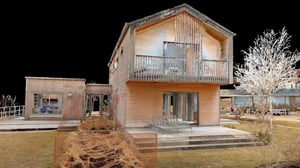
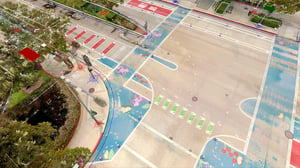
From SLAM robustness and drift reduction to image clarity and structured export formats, our proprietary system software defines the quality of NavVis LX-series data. Download a sample and see the results for yourself.

NavVis System Software Evolution - Value in motion
![website-2026-SystemSoftware_timeline_VLX_2020]()
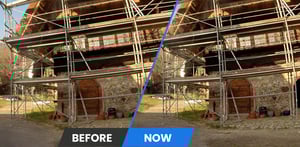
2020 – HDR Imaging for More Natural Panoramas
NavVis VLX
Feature Highlights
- Introduced HDR imaging for improved panorama quality
- Reduced overexposure in bright areas and improved detail in darker regions
- More natural-looking outdoor imagery in sunny conditions
![website-2026-SystemSoftware_timeline_VLX_2021]()
2021 – More Reliable Image Capture & System Stability
NavVis VLX
Feature Highlights
- Improved automatic and manual triggering for clearer, more consistent image capture
Performance & Stability Improvements
- More resilient camera drivers with improved error handling
- More reliable sensor initialization during device startup
- Smoother installation, update, and recovery workflows
- Improved stability during capture
![website-2026-SystemSoftware_timeline_VLX_2022]()
2022 – Safer Operation & Improved Low-Light Performance
NavVis VLX
Feature Highlights
- Improved image quality in low-light and cloudy conditions
- Consistent imaging performance across a wider range of environments
Performance & Usability Improvements
- Quick toggle between automatic and manual camera triggering from the top bar
- Faster camera initialization
- More responsive quality map rendering
- Added overheating protection to safeguard device longevity
![website-2026-SystemSoftware_timeline_VLX_2023]()
2023 – Sharper Imaging, Reduced Drift & Better Mapping Control
NavVis VLX
Feature Highlights
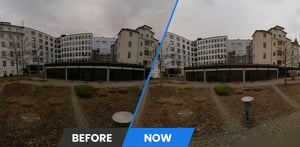
- Significantly improved panorama sharpness and overall image clarity
- Reduced image noise for cleaner visual output
Performance & Mapping Improvements
- Touch-based live visualization controls (zoom, pan, rotate) directly on the device
- Significantly reduced visually noticeable drift during mapping
- Faster panorama rendering through optimized threading
![website-2026-SystemSoftware_timeline_VLX_2024]()
2024 – Stronger SLAM, Smoother Navigation & NavVis MLX Launch
NavVis VLX
Feature Highlights
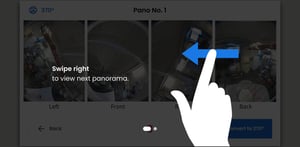
- Swipe-based panorama navigation for more intuitive, touchscreen-native interaction
Performance & Workflow Improvements
- Enhanced SLAM robustness for more stable mapping in challenging environments
- Improved handling of large datasets
- Refined control point workflows and mapping statistics
- Automatic safe-stop when memory runs low to protect captured data
![website-2026-SystemSoftware_timeline_MLX_2024]()
2024 – Stronger SLAM, Smoother Navigation & NavVis MLX Launch
NavVis MLX
Feature Highlights
- Launch of NavVis MLX
- SLAM tracking bar for real-time capture feedback
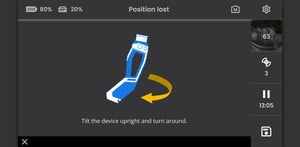
- SLAM lost recovery to regain tracking during difficult scans
Performance Improvements
- Major improvements to SLAM accuracy, drift reduction, and robustness
- Stronger performance in challenging outdoor environments
- Continuous quality map updates during scanning
![website-2026-SystemSoftware_timeline_MLX_2025]()
2025 – Improved Usability, Connectivity & Language Support
NavVis VLX & NavVis MLX
Feature Highlights
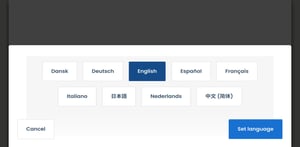
- Multi-language support: German and Chinese
Performance & Usability Improvements
- Improved dataset handling and smoother scrolling
- Enhanced vertical view controls
- In-app Wi-Fi support for direct device connection
- Faster and more intuitive software updates via on-device update workflows
NavVis MLX (only)
Performance Improvements
- Improved robustness of SLAM re-localization after tracking loss
![260209-website-navvis-economics-hero]()
2026 – Continuous Panorama Capture & Faster On-Site Workflows
NavVis VLX & NavVis MLX
Feature Highlights
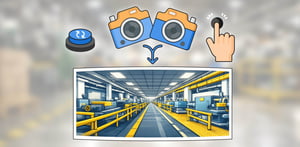
- Continuous Panorama Capture (Open Beta) enables panorama capture while walking, reducing the need to stop and allowing users to save up to 50% time on site
- Expanded language support: Spanish, Italian, French, Dutch, Danish, and Japanese
Performance & System Improvements
- Improved AUTO trigger mode saves up to 20% time on site and enables more reliable panorama capture, especially outdoors
- JPEG-XL compression introduced for raw image recording, improving storage efficiency while maintaining image quality
More features and improvements to come this year…


Resources